
Introduction
Bridge saw installation is a technically demanding commissioning process where every structural, electrical, and hydraulic decision directly impacts output quality, blade life, and operator safety. Get it right, and you've built a precise foundation for every countertop seam, miter cut, and dimensional tolerance your shop produces.
Realistic installation requires either an in-house team experienced with heavy industrial machinery or a qualified technician. Improper setup manifests as out-of-square cuts, accelerated blade wear, machine vibration, and potential warranty voidance.
According to Dynamic Stone Tools' bridge saw setup guide, leveling and alignment errors account for the majority of cut quality complaints traced back to the setup phase — yet these problems often go undiagnosed for weeks while fabricators incorrectly blame blades or material.
This guide walks through the complete installation method for a stone bridge saw, from site preparation through step-by-step setup to first-cut validation, following best-practice standards used in professional fabrication shops.
TL;DR
- Proper installation starts with the foundation: reinforced concrete, correct leveling, and bridge-to-table squaring before anything else
- Complete site prep first — floor load capacity, power supply, water access, and ventilation must be confirmed before the machine arrives
- Sequence matters: rushing or skipping steps in the assembly and alignment process creates problems that only show up once production starts
- Poor cut quality after startup almost always traces back to skipped leveling or alignment during installation
- Test cuts and dimensional checks after installation are required, not optional
Pre-Installation Requirements and Safety Considerations
Installation cannot proceed safely or successfully without confirming the site meets structural and utility requirements. This is the go/no-go phase before delivery.
Site and Structural Readiness
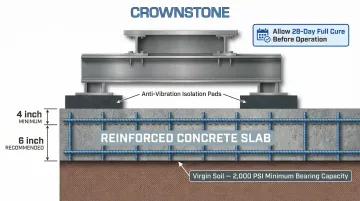
Floor load capacity: Bridge saws are heavy machines generating significant vibration during operation. Park Industries specifies a minimum 4-inch reinforced concrete slab, with 6 inches recommended using rebar reinforcement. Additional slab requirements include:
- Moist-cured for five days, fully cured for 28 days before installation
- Excavation reaching virgin soil with minimum 2,000 PSI bearing capacity
Anti-vibration mounts between the machine base and floor are critical. Any floor flex transmits micro-vibrations through the bridge and cutting head, causing blade wander, wavy cuts, chipping, and premature blade wear. If load capacity is uncertain, consult a structural engineer before scheduling delivery.
Space requirements: The installation footprint must account for:
- Machine dimensions plus clearances for slab loading/unloading
- Operator movement zones
- Water drainage paths
- Maintenance access on all sides
Verify clearances against the manufacturer's manual specifications before delivery. Crown Stone USA's bridge saw tables, for example, have a standard footprint of 126" x 77", with extended widths up to 138" available.
Utilities confirmation: Before the machine arrives, verify:
- Electrical: Dedicated supply matching voltage, phase, and amperage requirements. Park Vektor requires 480V AC, 3-Phase, 80 AMP; Crown Stone USA's Avalanche Pro requires 208–240V, 60A (three-phase) or 100A (single-phase).
- Water supply: Lines and drainage in place. CNC models may require up to 10 GPM at 45 PSI, with water filtered to 50 microns for spindle protection.
- Ventilation: Adequate airflow to remove heat, slurry mist, and stone dust
Machine Inspection and Tools Required
Upon delivery, conduct a thorough inspection before unpacking:
- Verify all components against the packing list
- Check for shipping damage (dents, cracks, bent components)
- Report any damage to the carrier and supplier immediately
- Do not begin installation on a damaged machine
Essential tools for installation:
- Precision machinist's level (not a builder's bubble level)
- Dial indicator with magnetic base
- Large machinist's square
- Torque wrenches
- Forklift or hoist rated for machine weight (CNC bridge saws like the Park Vektor weigh 16,000 lbs)
- Alignment shims
- Calibrated measuring tape
Do not proceed with installation if any of the following conditions exist: inadequate floor reinforcement, incorrect electrical supply, or a damaged structural component. Correct the issue first.
How to Install a Bridge Saw: Step-by-Step
Bridge saw installation follows a strict sequence. Each step creates the reference condition for the next one. Shortcuts taken early—particularly in leveling and alignment—compound into quality and safety problems that are difficult and expensive to correct after the machine is in production.
Step 1 — Foundation Preparation and Machine Positioning
Confirm the foundation is clean, level, and structurally sound. Position anti-vibration mounts or isolation pads at each support point per the manufacturer's layout drawing.
Use a rated forklift or overhead crane to move the machine into position — do not drag it on its frame. Align the machine's base to the planned cutting orientation relative to the shop floor and slab handling workflow.
Step 2 — Assembly and Leveling
If the machine ships partially disassembled, follow the manufacturer's assembly sequence to attach the bridge, crossbeam, and cutting head.
Precision leveling procedure:
- Place a precision machinist's level across the work table in multiple positions:
- Front-to-back on both left and right edges
- Side-to-side at both ends and center
- Adjust leveling feet incrementally until all readings fall within the manufacturer's tolerance
- Industry standard: ±0.5mm over the full table span

A non-level table causes the slab to sit unevenly, producing variable cut depths and potential blade binding.
Step 3 — Squaring the Bridge to the Table
The bridge's travel direction must be precisely perpendicular to the cutting fence. Even 1mm of drift over 1 meter of bridge travel will produce visibly non-square seams in countertop production.
Squaring procedure:
- Mount a dial indicator to the bridge carriage, touching the fence
- Run the bridge through its full travel range
- Monitor the dial indicator—any change in reading indicates the bridge rails are not square to the fence
- Adjust the rail or table mounting until the bridge runs true
The Natural Stone Institute specifies that stone-to-stone countertop seam widths must be within ±0.4mm. Your bridge squaring directly determines whether you can meet this standard.
Step 4 — Electrical, Water, and Hydraulic Connections
Electrical: All connections must be made by a qualified electrician following the manufacturer's wiring diagram. Bridge saws operate in wet environments and must comply with NEC Article 670 (industrial machinery) and Article 310 (wet location conductors). Verify correct voltage and phase before powering on.
Water system: Connect supply lines to the blade cooling system and verify adequate flow rate at the blade cutting interface. OSHA 29 CFR 1926.1153 requires stationary masonry saws to use integrated water delivery systems that continuously feed water to the blade for silica dust suppression. Typical minimum flow: 3–5 GPM for a 16-inch blade. Confirm drainage is in place before the first test run.
Hydraulic systems: On hydraulic or CNC-equipped machines, connect hydraulic lines per the schematic and purge air from the system before operation. ISO 4413 standards require cylinders to be mounted for self-bleeding or with accessible external air bleeds. Trapped air causes jerky machine movements.
Step 5 — Blade Mounting and Initial Configuration
Install the correct diamond blade for the machine and intended stone material. Verify:
- Blade diameter matches machine specifications
- Arbor bore size is correct (common sizes: 1 inch, 50mm, or 60mm)
- Maximum RPM rating marked on the blade is never exceeded by the spindle's no-load RPM
Torque the arbor flanges to the manufacturer's specification—do not overtighten or undertighten. On CNC or semi-automatic machines, configure control panel settings (cutting depth, feed rate, blade RPM) following the manufacturer's setup guide.
Crown Stone USA's Avalanche Pro uses a touchscreen HMI that puts cutting depth, feed rate, and RPM controls on a single screen — fewer menus means fewer setup errors during initial configuration.
Step 6 — Calibration and Break-In
Run the machine through its axis range without the blade engaged to confirm smooth, unrestricted movement. Then perform break-in cuts on scrap material at reduced feed rate to allow the blade to develop its optimal diamond exposure profile. Verify that the water system delivers flow to the cutting interface throughout the test run.
Post-Installation Checks and Validation
Once the saw is mechanically set and aligned, run a defined validation process before touching any customer material. Problems that slip through here show up mid-cut on a $400 slab — not an ideal discovery.
Visual and structural checks:
- Inspect all fasteners and connections for proper torque
- Verify no hydraulic or water leaks
- Confirm all guards and safety interlocks are in place and functional
- Check blade for proper seating on the arbor
Dimensional accuracy test:
- Cut several pieces of scrap stone to a specific dimension
- Measure results with a precision measuring tape or digital caliper
- Check squareness of cut corners with a machinist's square
- Compare against manufacturer's stated accuracy specification
High-end CNC bridge saws validate accuracy using laser interferometers per ISO 230-2 standards, achieving bi-directional positional accuracy of ±0.004 inches. Any deviation outside tolerance requires re-checking leveling, bridge squareness, and fence alignment before production begins.
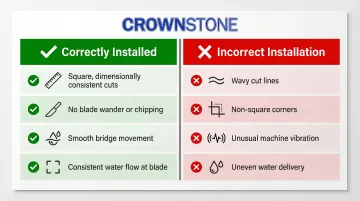
Indicators of correct vs. incorrect installation:
✅ Correctly installed:
- Cuts are square and dimensionally consistent
- Free of blade wander or excessive chipping
- Bridge moves smoothly without vibration surges
- Water flow is consistent at the blade throughout the cut
❌ Incorrect installation:
- Wavy cut lines
- Non-square corners
- Unusual machine vibration
- Uneven water delivery
Document the installation results: Record leveling measurements, alignment readings, and test cut dimensions as a baseline for future maintenance checks. That documented baseline also gives you hard data to reference when diagnosing any performance drift down the line — and backs up warranty claims with specifics rather than estimates.
Common Installation Problems and Fixes
These three problems account for the majority of issues encountered during or immediately after bridge saw installation. Most trace back to the foundation prep and leveling phase — get those right, and the rest follows.
Problem 1: Excessive vibration during the first test run
Symptoms: Unusual shaking during blade operation — sometimes audible as rattling or surging.
Cause: Anti-vibration mounts not properly seated, leveling feet not making full contact with the floor, or blade arbor flanges that are uneven or under-tensioned.
Fix: Recheck all leveling foot contact points, confirm anti-vibration pads are correctly installed, then remove and inspect the blade arbor flanges for flatness. Reinstall the blade using the manufacturer's torque specification.
Problem 2: Cut edges are not square
Symptoms: Cut pieces don't form a true 90° corner, leaving a visible gap at seam joints.
Cause: The bridge is not squared to the fence — the most common post-installation alignment error.
Fix: Re-run the dial indicator test along the fence with the bridge traversing its full range. Identify the direction and amount of drift, then adjust the bridge rail mounting or table position until the bridge runs true. Anything outside the manufacturer's squareness tolerance needs correction before production starts.
Problem 3: Water flow is inadequate or uneven at the blade
Symptoms: Parts of the blade run dry during cutting, causing rapid blade wear, thermal glazing, or slurry buildup in the kerf.
Cause: Nozzles positioned incorrectly during installation, insufficient supply line pressure, or a partial blockage from installation debris.
Fix: Flush all water lines before first production use. Reposition nozzles to direct flow into the cut kerf — not just onto the blade face — and verify supply pressure meets the minimum flow rate spec. Insufficient coolant is a leading cause of premature blade failure, leading to overheating, core cracks, and segment loss.

Pro Tips for Installing a Bridge Saw Effectively
Experienced fabricators consistently point to three areas where installation decisions have the longest-lasting impact on cut quality and uptime:
Don't rush leveling and squaring. This is where shortcuts cost the most. An extra day spent getting the machine level and square produces accurate cuts from day one — a rushed setup can take weeks of troubleshooting to diagnose the resulting problems.
Document everything. Photograph leveling measurements, record dial indicator readings at squaring, and keep a written log of all configuration settings. That baseline documentation is invaluable for maintenance checks and means any support call — including Crown Stone USA's remote assistance — gets resolved faster with real data in hand.
Run with a qualified operator from the first cut. Even a well-installed bridge saw needs an experienced operator during break-in. The first 50–100 production cuts reveal residual alignment or vibration issues that test cuts often miss.
Conclusion
Bridge saw installation quality is the single largest factor in cut precision, blade life, and long-term machine reliability. A correctly installed machine produces accurate, consistent cuts from its first production day; a poorly installed one creates problems that are often misdiagnosed as blade or material issues for weeks.
Treat installation as a structured commissioning process with defined checkpoints. Before cutting the first slab, confirm you've covered each stage:
- Verified site prerequisites (floor load, power, water supply)
- Followed the installation sequence without skipping steps
- Completed post-installation validation cuts
- Documented machine settings and alignment specs for future reference
Shops that take this approach rarely chase phantom blade or material problems. The ones that rush it often do — for weeks.
Frequently Asked Questions
What is a bridge saw used for?
A bridge saw is a precision stone cutting machine used in fabrication shops to make straight cuts and miter cuts through large slabs of granite, marble, quartz, and engineered stone for countertops, tiles, and custom stone work.
How much does a bridge saw cost?
Entry-level manual bridge saws range from $18,000 to $30,000, while premium CNC models run $85,000 to $350,000+ depending on features and origin. American-made machines typically carry a price premium but offer easier parts sourcing and stronger warranty support.
How long does it take to install a bridge saw?
Full installation—covering site prep, leveling, alignment, and system validation—typically takes one to several days. Note that concrete foundations must cure for 28 days before the machine goes in, so total project lead time is longer than the installation itself.
What type of foundation does a bridge saw require?
A bridge saw requires a reinforced concrete floor slab with minimum 4-inch thickness (6 inches recommended) and anti-vibration mounts to isolate machine vibration from the foundation. An inadequate foundation is one of the most common causes of ongoing cut quality problems.
Can I install a bridge saw myself, or do I need a professional technician?
Experienced fabricators with mechanical aptitude can manage installation with careful adherence to the manufacturer's manual, but the leveling and alignment steps in particular benefit from someone experienced with precision machinist's tools. Many manufacturers offer installation support or can recommend qualified technicians.
What is the minimum water flow rate required for a bridge saw?
Most bridge saws require a minimum of 3-5 GPM at the blade, with CNC models potentially needing up to 10 GPM at 45 PSI depending on configuration. Insufficient flow is a leading cause of premature blade wear and silica dust exposure.