
Introduction
A miter saw that isn't properly calibrated will produce cuts that look correct on the gauge but fail in practice — resulting in gaps, wasted material, and costly rework. In construction, rework accounts for 1–20% of total project costs, with most studies clustering between 4–10%. For finish carpenters and woodworkers, even a 0.005-inch gap in a mitered casing joint is visible from four feet away.
This guide walks woodworkers, finish carpenters, and hobbyists through every step of miter saw setup — from pre-checks and tool alignment through validation cuts — so your saw is dialed in before the first cut hits production.
The same principle applies regardless of material: a cut made on an uncalibrated saw cannot be undone. Getting setup right before production starts is always cheaper than fixing the damage after.
TL;DR
- Miter saw setup must be done before every major project, not just when the saw is new
- Setup runs in four stages — mechanical checks, fence squareness, blade alignment, and angle calibration — each one building on the last
- Skipping validation cuts is why setup errors go undetected until material is wasted
- Most errors are fixable with tools you already have — a square, a protractor, and a few adjustment screws
Before You Begin: Prerequisites, Safety, and Tools
Before making any adjustments, confirm these baseline requirements:
- Stable surface — flat, level platform with all four feet in solid contact
- Correct blade — crosscut blades for wood; never substitute abrasive wheels
- Power disconnected — unplug the saw before any mechanical adjustments
Safety Requirements
OSHA and ANSI standards mandate specific safety measures for woodworking machinery:
- Eye and face protection compliant with ANSI Z87.1 standardsEye and face protection compliant with ANSI Z87.1
- Hearing protection when noise reaches or exceeds 85 dB TWA
- Dust mask or respirator — wood dust is a recognized health hazard under 29 CFR 1910.1200
- Blade guard in working condition per ANSI O1.1-2013
- Dust collection connected where applicable to reduce airborne particles
Tools Required for Setup
- Combination square or engineer's square — checks fence and blade alignment
- Digital angle gauge or sliding bevel — calibrates miter and bevel angles
- Ruler or tape measure
- Screwdriver and Allen key set — for loosening and tightening adjustment screws
- Scrap material for test cuts
- Pencil or chalk for marking reference lines
How to Set Up Your Miter Saw Step by Step
Miter saw setup follows a defined sequence: table → fence → blade → detents. Adjusting steps out of order creates compounding errors that are difficult to diagnose.
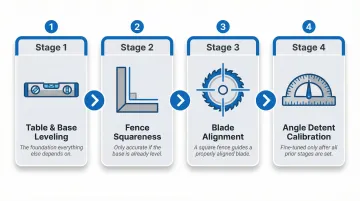
Leveling the Saw and Securing the Base
Check that all four feet make solid contact with the work surface. A wobbly base transfers directly to cut inconsistency. Use shims where needed to eliminate any rocking motion.
Squaring the Fence to the Blade
Place a reliable square against the fence and the flat of the blade (not the teeth). The blade face should be perfectly perpendicular to the fence. Check both the left and right sides of the blade.
If you find a gap:
- Loosen the rear fence adjustment bolts
- Adjust the fence position until the square sits flush against both surfaces
- Tighten the bolts and recheck
Squaring the Table (Miter Angle at 0°)
Set the miter angle to its 0° detent position. This produces a 90° crosscut — the number on the gauge refers to degrees of swing from square, not the actual angle of the cut face.
Use a square to verify the blade is perpendicular to the fence from the front view. If there's a gap, adjust the miter detent stop screw until the blade sits at true 90° to the fence.
Checking the Bevel Angle
Tilt the saw head back to its 0° bevel position. Use a square against the table surface to confirm the blade is perfectly vertical (90° to the table).
A misaligned bevel is a hidden error that causes one face of a cut to be subtly angled. Adjust via the bevel lock or stop screw if the blade isn't perfectly vertical.
Calibrating the Angle Detents
After confirming squareness, test each hard-stop detent with a digital angle gauge or machinist's protractor. Common detent positions include:
- 0° (straight crosscut)
- 15°
- 22.5°
- 31.6° or 31.62°
- 45°
- 60° (on some models)
Trade testing indicates that fractional degree settings on miter saws are almost always a guess. Note which stops are accurate and which need fine adjustment.
Field workaround: Mark inaccurate stops with a paint pen and note the actual measured angle. This is faster than micro-adjusting every detent and works well in multi-operator shops.
That workaround is practical for wood and general fabrication — but stone is less forgiving. Once a stone slab is cut, the angle is permanent; there's no trimming or adjusting after the fact. This is why stone fabrication equipment approaches angle control differently. Crown Stone USA's bridge saws, for example, use air-powered indexing to pull the table to exact 90° and 45° positions, removing the guesswork from detent calibration entirely.
How to Validate Your Miter Saw Setup with Test Cuts
Validation cuts must be made before production. Always use scrap material of the same type and thickness as your final workpiece. Run through each test below in sequence — square first, then miter — so any fence or blade issues surface before they ruin good stock.
Testing the 90° Cut
Make a crosscut at 0° (producing a 90° cut). Flip one piece and press the cut faces together. Joined faces should form a perfectly flat surface with no visible gap.
Any gap reveals fence misalignment or blade drift. This simple flip test is the most reliable field check for squareness.
Testing the 45° Miter
Make two 45° miter cuts and press them together at the corner. The assembled corner should form a clean 90° angle. Use a square to verify.
Reading the gap:
- Gap at the outside of the corner = actual cut angle is slightly less than 45°
- Gap at the inside of the corner = actual cut angle is slightly more than 45°
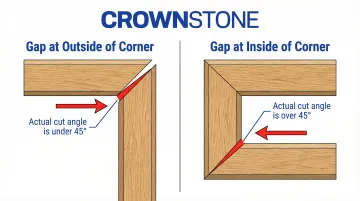
This tells you exactly which direction to adjust the detent stop screw — and whether your overall setup passes or needs recalibration.
Indicators of a Correct vs Incorrect Setup
Pass indicators:
- No light gap between joined faces for square cuts
- Miter corners close flush with no rocking
- Repeated cuts at the same setting produce identical results
Fail indicators (recalibration needed):
- Visible gaps when test pieces are joined
- Corners that don't close or rock when pressed together
- Inconsistent results from the same detent setting
Common Miter Saw Setup Problems and How to Fix Them
Cuts Are Consistently Off Square Even After Adjustment
Problem: All crosscuts are off 90° by the same margin even after setting the detent to 0°.
Cause: The detent stop screw has drifted from repeated use or transport. The fence itself may be bent or worn on one side.
Fix:
- Loosen the stop screw, place a reliable square against the fence and blade, and re-zero the detent
- If the fence is physically damaged, replace it before attempting any recalibration
Miter Corners Have Consistent Gaps at the Same Side
Problem: Every 45° miter pair has a gap on the same side (either always inside or always outside).
Cause: The saw's 45° detent is off by a fraction of a degree. Manufacturer data shows that a 1° error over a 1-inch span results in a 1/32-inch gap, and 3° over a 5-inch span yields a 3/8-inch gap.
Fix:
- Use a digital angle gauge to measure the actual blade angle at the 45° detent
- Adjust the stop screw incrementally, making a test cut between each micro-adjustment until the gap closes
Blade Wanders During the Cut (Kerf Drifts)
Problem: The cut line starts correctly but the blade drifts partway through, particularly on stock over 1½ inches thick.
Cause: A dull or damaged blade, insufficient downward pressure on the workpiece, or the workpiece lifting slightly off the table mid-cut.
Fix:
- Inspect the blade for missing or chipped teeth; OSHA 29 CFR 1910.213 requires dull or damaged saws be removed from service immediately
- Use a clamp or hold-down to secure the material
- Ensure the material is fully seated against the fence and flat on the table before starting the blade
- Support long workpieces the entire length to keep them level and prevent blade pinch
Pro Tips for Getting Consistently Perfect Cuts
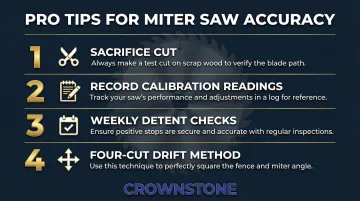
Start with a sacrifice cut. Trim 1/8″ off the factory end of any board before measuring and marking. Factory ends are rarely truly square and will throw off every measurement that follows.
Write down your calibration readings. After a successful setup, record the actual measured angle at each detent (e.g., "45° detent = 44.8°") and tape that card to the saw stand. Especially useful in multi-operator shops where settings may shift between sessions.
Check 0° and 45° detents at the start of each work week. High-volume cutting puts constant stress on calibration. Pro Tool Reviews recommends a quick flip test before every use; at minimum, verify both detents weekly with a reliable square.
Use the four-cut method to catch drift early. Make four successive cuts, referencing the previous cut each time. Any error compounds by 4x — making fractional-degree inaccuracies easy to spot and correct before they ruin stock.
Conclusion
Miter saw setup is not a one-time task. Calibration drifts from vibration, transport, and hard use, so periodic re-checking is part of responsible shop practice.
Five minutes of calibration at the start of a job saves far more time and material than diagnosing bad cuts mid-project. For fabricators, a validated setup before the first production cut is what separates clean, billable work from costly rework.
Frequently Asked Questions
How do I know if my miter saw is properly calibrated?
The most reliable test is making two square crosscuts and pressing the cut faces together — a gap anywhere means the setup is off. A digital angle gauge at the 0° and 45° detents provides a more precise check.
How often should I check my miter saw's calibration?
Calibration should be checked before every major project, after transporting the saw, after any blade change, and at minimum once a week in high-use shop environments.
Why don't my 45-degree miter cuts close at the corners?
The two most common causes are a slightly off 45° detent or both pieces cut from the same side. Outside corner gaps mean the angle is under 45°; inside gaps mean it's over 45°.
What is the difference between a miter cut and a bevel cut?
A miter cut is an angled cut across the face of the board (the saw base pivots left or right), while a bevel cut is an angled cut through the thickness of the board (the saw head tilts). Compound cuts combine both simultaneously.
Can miter saws be used to cut stone or tile?
No. Standard miter saws are designed for wood, and manufacturers explicitly prohibit cutting masonry or using abrasive wheels — abrasive dust jams guards and sparks burn plastic components. Cutting granite, marble, or quartz requires purpose-built equipment like a bridge saw, which is engineered to handle the dust, heat, and hardness those materials demand.
Why does my miter saw read 0° but the cut is not 90°?
On most modern miter saws, 0° on the gauge means the blade is in its square/straight-cut position — the number refers to the degrees of swing from square, not the actual angle of the cut face. If even the 0° cut is off 90°, the detent stop screw needs adjustment.