
Introduction
Many ceramic tile fabricators struggle with the limitations of manual cutting tools when faced with complex profiles, radius corners, or precision sink cutouts. Standard wet saws and snap cutters work well for straight cuts, but they can't handle the intricate geometries that define custom tile work—decorative inlays, curved edges, or multi-radius cutouts for plumbing fixtures.
CNC routers solve this problem directly—but ceramic tile's brittleness and glaze sensitivity make the process more demanding than routing wood or even natural stone. Porcelain tile rates 7–8 on the Mohs hardness scale, nearly as hard as granite, yet it remains fragile under improper cutting forces.
A parameter error that would cause minor chipping in granite translates directly into cracked rejects when working with ceramic. Getting the process right requires dialing in tooling, fixturing, and feeds before the first production run.
This guide walks through the complete CNC routing process for ceramic tile—tooling selection, fixturing, speed and feed parameters, and coolant management—including when routing makes sense versus faster alternatives like bridge saws for high-volume straight cuts.
TLDR
- Diamond tooling is mandatory — carbide bits fail immediately on ceramic's abrasive silica content
- Vacuum or mechanical fixturing prevents micro-shifts that cause cracks and inconsistent cuts
- Spindle speeds of 18,000–24,000 RPM are typically required for diamond bits on ceramic
- Continuous water cooling is required — it protects tile integrity and controls hazardous silica dust
- CNC routing suits custom shapes and cutouts — bridge saws remain faster for straight-line production cuts
How to Use a CNC Router for Precise Ceramic Tile Fabrication
Step 1: Design Your Toolpaths and Prepare Your CAD/CAM File
Import your tile dimensions into CAD/CAM software such as Vectric VCarve or Mastercam. Set the material profile to account for ceramic's hardness and brittleness; ceramic's high silica content and brittle glaze demand tighter tolerances than wood or metal. Specify climb milling direction on finish passes — it reduces chipping on glaze edges by directing cutting forces into the material rather than lifting away from it.
Define separate toolpaths for each operation type:
- Profile cuts for perimeter shaping
- Pocket cuts for recessed areas
- Engravings for surface detail
- Radius corners for rounded edges
Configure lead-in and lead-out moves at each entry point. Abrupt tool engagement causes entry-point chipping on glazed surfaces. A gradual arc or tangential approach distributes cutting forces more evenly.
Run a simulation preview before generating G-code. Confirm that:
- Depth of cut does not exceed tile thickness
- Cut sequences minimize stress on thin or unsupported sections
- Tool clearance paths avoid fixture clamps
Step 2: Select and Install the Correct Tooling
Use diamond-tipped router bits or diamond-plated core bits designed specifically for ceramic and porcelain. Carbide bits dull within minutes on ceramic's silica content, producing torn edges and rapid heat buildup.
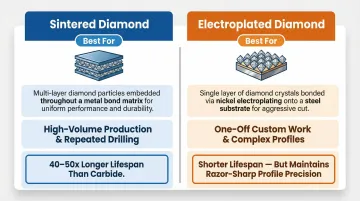
Sintered vs. Electroplated Diamond Bits:
| Tool Type | Construction | Best For | Lifespan |
|---|---|---|---|
| Sintered Diamond | Diamond grit blended with metal matrix | High-volume production, repeated drilling | 40-50x longer than carbide |
| Electroplated Diamond | Single diamond layer bonded to tool body | One-off custom work, complex profiles | Shorter, but maintains sharp profile |
Bit diameter selection:
- 6mm-10mm diameter: Tight radius work, interior cutouts
- 12mm+ diameter: Straight edge profiling, faster material removal
Inspect the bit before installation. Check for:
- Wear on the diamond matrix
- Buildup or residue from previous cuts
- Clean, secure fit in the collet
Zero the Z-axis accurately using a tool-length sensor or manual probe method. Even 0.5mm error in Z-height causes inconsistent depth of cut and edge quality issues.
Step 3: Fixture the Tile Securely to the Machine Bed
Two primary fixturing methods work for ceramic tile.
Vacuum Table (Preferred for Thin Tiles)
- Distributes clamping force evenly across the tile surface
- Prevents point-load cracking that occurs with mechanical clamps
- Requires 5.5 CFM per square foot of table area (e.g., a 4'x8' table needs ~176 CFM pump capacity)
- Works best with porous spoilboard materials (MDF or LDF) that allow vacuum pressure distribution
Mechanical Hold-Downs (Better for Thick Tiles)
- Rubber-padded clamps prevent direct metal-to-ceramic contact
- Position clamps outside the cutting area whenever possible
- Avoid over-tightening — ceramic cracks under uneven pressure
Confirm tile flatness before cutting. Use a dial indicator or straight edge to verify the tile has no bow or warping. Large-format tiles warp slightly, and even 1mm of bow causes depth-of-cut inconsistency across the surface.
Place a sacrificial spoilboard (MDF or phenolic) under the tile. This protects the machine bed and allows full-depth profile cuts without damaging the vacuum table surface.
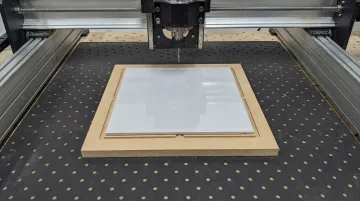
Phenolic spoilboard resists moisture better than MDF, making it the better choice for wet cutting. It's non-porous, so you'll need grooves or gasketing cut into it to route vacuum pressure across the surface.
Step 4: Run the Cut and Monitor Actively
Load your G-code file and set the X/Y/Z zero origin at a consistent reference point (typically the front-left corner of the tile). Run a dry pass first (spindle off, no coolant) to verify:
- Toolpath clearance
- Fixture placement
- No collision risks
Once the dry pass clears, enable coolant flow before starting the spindle. Water mist or direct water cooling must run continuously from the first moment the bit contacts the tile. Cutting ceramic dry accelerates diamond tool wear, causes thermal shock cracks, and generates hazardous respirable silica dust (OSHA PEL: 50 µg/m³).
Monitor the cut actively during the first pass:
- Listen for chipping sounds — indicates incorrect feed rate or tool engagement
- Watch coolant coverage — ensure water reaches the cutting zone, not just near the bit
- Check cut edge quality after the first completed profile before running the full program
If edge quality looks poor on the first pass, stop and adjust parameters before wasting additional tiles.
When Is CNC Routing the Right Choice for Ceramic Tiles?
CNC routing earns its place when the fabrication task demands complex geometry, tight tolerances, or surface detail that manual cutting or a bridge saw can't deliver efficiently. For straightforward cuts, it's often the slower and more expensive option.
Ideal use cases for CNC routing ceramic tile:
- Custom-shaped tiles for mosaic inlays
- Decorative cutouts in floor medallions
- Radius corners in kitchen backsplash installations
- Sink or faucet hole cutouts in large-format porcelain panels
- Engraved surface patterns on ceramic art tiles
- Automated multi-cutout production with consistent tolerances
When CNC routing becomes inefficient or risky:
- High-volume straight-line cutting: A precision bridge saw is faster and lower-cost per cut for ripping tiles to width or cutting simple rectangles
- Very thin tiles under 6mm: Fracture risk is high under router cutting forces, even with vacuum fixturing
- Glazed tiles with highly reflective surfaces: Depth sensing can be difficult, requiring manual Z-axis verification
For shops running high volumes of straight cuts, a dedicated bridge saw will deliver better throughput at a lower cost per cut. Crown Stone USA manufactures bridge saws designed for production stone and tile environments — worth evaluating if straight-line cutting makes up the bulk of your workload.
What You Need Before CNC Routing Ceramic Tiles
Preparation quality directly determines whether your output is a clean, precise tile component or a cracked, chipped reject. Get the equipment, tooling, and safety controls right before the first cut — everything downstream depends on it.
Equipment and Machine Requirements
The CNC router must have:
- High-frequency spindle sustaining 18,000–24,000 RPM — required for diamond tooling on ceramic
- Rigid gantry with minimal backlash (any axis flex amplifies chipping in brittle material)
- Integrated coolant delivery: water mist or flood coolant compatible with continuous operation
- Working area sized to the tile format being processed
- Vacuum table providing consistent holding force across the full tile surface, if used
Vacuum pump CFM requirements vary by tile thickness and format—thicker tiles require higher vacuum force to prevent micro-movement during cutting.
Tooling, Materials, and Workholding
Tooling selection affects both cut quality and tool life. Diamond core bits handle circular cutouts; diamond profile bits shape edges. Always validate parameters on scrap with a test bit before production cuts, and keep replacements on hand — diamond tooling wears faster on glazed ceramic than unglazed porcelain.
Consumables to have staged before cutting:
- Sacrificial spoilboard material (MDF or phenolic sheet)
- Clean water or manufacturer-specified water-soluble coolant
- Clamping or vacuum fixturing hardware matched to your tile format
Operator Knowledge and Safety Readiness
Getting the equipment and tooling right matters — but silica dust exposure is where failure becomes a health crisis, not just a bad cut.
Ceramic tile contains 10–30% crystalline silica. OSHA sets a Permissible Exposure Limit (PEL) of 50 µg/m³ (8-hour TWA) for respirable crystalline silica, with an Action Level of 25 µg/m³. The two required engineering controls are wet cutting and local exhaust ventilation — both mandated under OSHA 29 CFR 1926.1153.
Always run with active coolant and ensure the shop has adequate water collection and filtration in place before any ceramic routing begins.
Key Parameters That Affect Cut Quality in Ceramic Tile Routing
Ceramic tile's hardness and brittleness mean parameter errors that would be minor on wood or even granite translate directly into cracked or chipped rejects. Getting the following four variables right is the core of precision ceramic routing.
Spindle Speed (RPM)
Diamond bits on ceramic require high surface footage to cut efficiently. Too low an RPM causes the diamond matrix to drag rather than abrade — creating micro-fractures below the cut surface and accelerating tip wear.
RPM ranges vary significantly by tool type and diameter:
| Tool Type | Tool Diameter | Recommended RPM |
|---|---|---|
| Weha Weramic CNC Core Bits | Standard | 1,400–2,800 RPM |
| Pearlman Easy Bit-K | 20mm | 7,200–9,000 RPM |
| Pearlman Easy Bit-K | 10mm | 10,000 RPM |
| Diamut CNC Core Bits | Standard | 4,000–8,000 RPM |
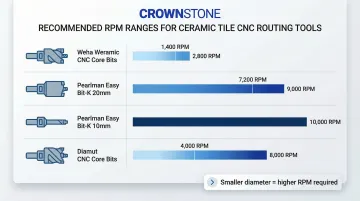
Note: Smaller diameter bits require higher RPMs to maintain optimal surface feet per minute. Glaze hardness (varies by manufacturer) can shift the optimal RPM window up or down by 10–15%.
Feed Rate (mm/min or in/min)
Feed rate controls how aggressively each diamond particle contacts the ceramic. Push it too fast and you get surface chipping and edge breakout. Too slow, and excess heat builds even with coolant running, causing diamond glazing — where the bit's surface polishes flat and stops cutting.
Recommended feed rates by operation type:
- Straight runs: 800–2,000 mm/min for sintered diamond bits
- Milling operations: 400–600 mm/min for profiling work
- Curved toolpaths: Reduce feed rate by 40–50% compared to straight runs
- Entry/exit moves: Reduce feed rate by 40–50% to prevent edge breakout
If chipping occurs on the first pass, reduce feed rate by 15–20% and re-test on scrap before adjusting spindle speed.
Depth of Cut Per Pass (DOC)
Unlike ductile materials, ceramic cannot absorb the lateral forces of a deep single pass. Full-depth cuts in one pass cause cracking along the cut line — multiple shallow passes distribute those forces safely.
DOC guidelines by tool and material:
| Tool Type | Material | DOC per Pass |
|---|---|---|
| Pearlman Easy Bit-K | Porcelain/Ceramic | 0.5 mm/pass |
| Pearlman Easy Bit-Prop(K) | Porcelain/Ceramic | 1.0–2.0 mm/pass |
| Diamar Electroplated Carving | Ceramic/Granite | 1.0–2.0 mm/pass (Max 4mm) |
DOC guidelines shift for ultra-hard porcelain versus standard ceramic — porcelain's increased hardness demands shallower passes to avoid subsurface cracking.
Coolant Flow Rate and Coverage
Heat builds at the bit-ceramic interface even when speeds and feeds are dialed in. Without adequate coolant flow, three problems compound quickly:
- Thermal stress causes subsurface cracking in the tile
- Rapid diamond glazing occurs on the bit
- Hazardous silica dust becomes airborne
Coolant coverage needs to be deliberate, not incidental. Here's what adequate flow actually looks like in practice:
Signs of adequate coverage:
- Continuous water flow at 10–15 L/min minimum (higher for larger operations)
- Water stream directed at the cutting zone, not just near the bit
- Visible water coverage on the tile surface around the cut
- No smoke, discoloration, or burn marks at the cut edge
Signs of insufficient coolant:
- Smoke at the cut line
- Burnt or discolored tile edge
- Bit cuts well initially but degrades within a single tile
- White residue or powder buildup on the tile surface
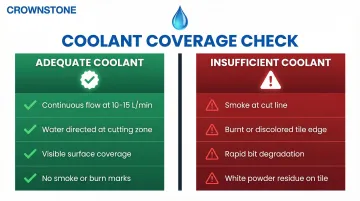
Coolant nozzle positioning must be adjusted for different tool diameters and cut depths. A nozzle set correctly for a 12mm bit may not provide adequate coverage for a 6mm bit cutting deeper.
Common Mistakes and How to Fix Them
Most ceramic tile routing failures trace back to wrong tooling, skipped setup steps, or feed/speed decisions made without accounting for the material. The machine usually isn't the problem.
Mistake 1: Using Carbide Instead of Diamond Tooling
Carbide bits dull almost immediately on ceramic's silica content, producing torn edges and rapid heat buildup. Diamond tooling outlasts carbide by a ratio of 40:1 to 50:1 in abrasive applications.
The fix: Specify sintered or electroplated diamond-tipped bits rated for ceramic and porcelain. If chipping appears on the first pass, check the bit specification before adjusting any other parameter.
Mistake 2: Inadequate or Uneven Tile Fixturing
A tile that moves even fractions of a millimeter during cutting produces inconsistent cut widths, tool deflection, and potential tile fracture.
The fix: If the tile shifts mid-cut, stop immediately—do not attempt to re-align and continue. Review:
- Vacuum pump performance (CFM output)
- Spoilboard seal condition
- Clamp placement and tightness
Re-fixture the tile completely before re-running the program.
Mistake 3: Running Without Coolant or With Insufficient Flow
Visible signs include:
- Smoke at the cut line
- Burnt or discolored tile edge
- Bit cuts well initially but degrades within a single tile
The fix: Verify the coolant nozzle is positioned to hit the cutting zone directly, not just near the bit. Confirm water flow rate before each session. Adjust nozzle angle if needed for better coverage.
Mistake 4: Incorrect Feed/Speed Combination Causing Chipping
Edge chipping on the glaze surface is the most common quality failure.
The fix: If chipping occurs:
- Reduce feed rate by 15-20% and re-test on scrap
- Check whether climb milling vs. conventional milling direction is set correctly in the CAM file
- Verify spindle speed matches bit manufacturer recommendations
Do not adjust multiple parameters simultaneously—change one variable at a time to isolate the cause.
Frequently Asked Questions
Can you cut tile with a CNC router?
Yes, CNC routers can cut ceramic tile, but only with diamond-tipped tooling and continuous coolant flow. Standard carbide bits and dry cutting will damage both the tile and the tool immediately, producing torn edges and rapid heat buildup.
What type of bit is best for CNC routing ceramic tile?
Sintered diamond bits are best for high-volume production, outlasting carbide by 40-50x with consistent performance. For one-off custom cuts or complex profiles, electroplated diamond-tipped bits hold sharper edges but wear faster on ultra-hard materials.
What spindle speed should I use when CNC routing ceramic tile?
Diamond tooling on ceramic requires 18,000–24,000 RPM, though exact settings depend on bit diameter and tile hardness. Smaller bits (6–10mm) need 10,000+ RPM, while larger core bits run at 4,000–8,000 RPM.
How do I prevent chipping when CNC routing ceramic tile?
Use diamond tooling rated for ceramic and reduce feed rate by 40–50% in curved sections and at entry/exit points. Also confirm your CAM file sets climb milling direction for glazed surfaces. Chipping is almost always caused by incorrect feed rate or tool engagement angle.
Do I need water or coolant when CNC routing ceramic tile?
Coolant is mandatory—not optional—for both tile quality and operator safety. Water prevents thermal cracking in the tile, controls hazardous silica dust (OSHA PEL: 50 µg/m³), and prevents diamond tool glazing. Any dry routing of ceramic should be treated as a process error.