
Introduction
CNC routers are essential productivity tools in stone fabrication shops—when they work. When they don't, downtime translates directly into missed deadlines and lost revenue. Unplanned CNC downtime costs stone fabrication shops between $2,000 and $5,000 per day in lost production alone.
Stone shop environments are hard on CNC equipment. Abrasive materials like granite, quartz, and marble accelerate wear on spindles, bearings, and tooling. Silica dust and water exposure corrode electrical connections, clog cooling passages, and contaminate linear guides. Deferred maintenance compounds all of it—turning gradual wear into sudden failures at the worst possible moment.
This guide covers:
- The most common CNC router problems and their root causes
- A step-by-step diagnosis and repair process
- When to fix a component versus replace it entirely
- How to prevent recurrence through targeted maintenance
TL;DR
- Common problems include poor cutting quality, spindle overheating, axis movement failures, and software errors
- Most issues are fixable when caught early — but only if you address the root cause, not just the visible symptom
- Use a 4-step process: identify → confirm root cause → fix → test
- Unchecked problems compound fast: scrap material, damaged components, and costly downtime stack up quickly
- Know when replacement is the better long-term investment than continued repairs
What Is a CNC Router?
A CNC router is a computer-controlled cutting machine that uses a rotating spindle and programmed tool paths to cut, carve, engrave, or shape materials with high precision.
Stone fabrication CNC routers are built specifically for this environment — reinforced heavy-duty structures, high-power water-cooled spindles (typically 10+ HP to 16 kW), and diamond tooling designed to handle the hardness and abrasiveness of granite, quartz, marble, and composites.
A CNC router is a system of interdependent components, and failure in any one area degrades overall performance. Core components include:
- Spindle
- Servo or stepper motors
- Linear guides and ball screws
- Control software
- Power supply cabinet
- Cooling systems
When your spindle overheats, it's rarely just the spindle — cooling system blockages, bearing contamination, or electrical faults may all be contributing factors.
Common CNC Router Problems
While CNC routers can present many symptoms, most shop-floor failures trace back to four predictable problem categories.
Problem 1: Poor Cutting Quality
Symptoms:
- Rough or chipped edges on finished pieces
- Inconsistent cut depth across the workpiece
- Burn marks on stone surfaces
- Excessive vibration during cuts
Likely causes:
- Dull or incorrect tooling for the material hardness
- Wrong feed rate or spindle speed settings
- Loose machine components (check spindle mount, gantry fasteners, rails)
- Inadequate workpiece clamping allowing movement during cuts
Diamond router bits offer up to 50 times longer tool life than carbide bits when cutting hard stone like granite, but even diamond bits degrade. Running spindle speeds too high or feed rates too low causes thermal damage, tool glazing (where the bit's surface becomes polished and loses cutting ability), and edge chipping.
| Material Type | Hardness/Abrasiveness | Recommended Tool Type | Spindle Speed (RPM) | Feed Rate (mm/min) |
|---|---|---|---|---|
| Granite | Hard & Brittle | Sintered Diamond | 5,000 - 7,000 | 200 - 500 |
| Quartz (Engineered) | High Resin Content | PCD (Polycrystalline) | 7,000 - 9,000 | 500 - 1,000 |
| Marble | Soft & Abrasive | Electroplated or PCD | 6,000 - 8,000 | 400 - 800 |

Problem 2: Spindle Overheating or Malfunction
Symptoms:
- Spindle slows mid-cut or stops entirely
- Grinding or whining noises from the spindle
- Unexpected shutdowns during operation
- Spindle runs at incorrect RPM
Likely causes:
- Blocked or failing cooling system (clogged water lines, pump failure)
- Worn bearings increasing friction and heat
- VFD (Variable Frequency Drive) setting errors or misconfiguration
- Loose electrical connections or short circuits
Spindles are the most expensive component in your CNC router, typically costing $3,000 to $15,000, and most fail within 3 to 5 years.
The main culprit is bearing contamination from dust and slurry — it breaks down bearing grease, causes heat buildup, and leads to bearing seizure. Address cooling issues first before investigating electrical causes.
Problem 3: Axis Movement Errors and Positioning Failures
Symptoms:
- Machine fails to home correctly at startup
- Cuts are misaligned or sized incorrectly
- Stepper motors skip steps mid-cut
- Gantry moves erratically or not at all
Likely causes:
- Worn belts or couplings allowing slippage
- Dirty or dry linear rails creating friction
- Stepper motor or driver faults (overheating, electrical issues)
- Limit switch failure preventing proper homing
- Mechanical obstructions (stone debris, slurry buildup)
Stone slurry acts as an abrasive grinding paste. When it infiltrates linear guide rails and ball screws, it accelerates wear, destroys seals, and blocks homing sensors.
Not every fault shows up in the mechanics — software and controller issues can mimic hardware failures and are often the last thing shops check.
Problem 4: Software and Control System Errors
Symptoms:
- Machine ignores commands or stops mid-program
- Cuts appear in wrong locations on the workpiece
- G-code doesn't execute as designed
- Error messages with no clear hardware fault
Likely causes:
- Incorrect post-processor settings for your controller
- Corrupt or incompatible G-code files
- Unstable PC-to-controller connection (USB issues, cable problems)
- Misconfigured work coordinate system (WCS) causing offset errors
Software errors are often misdiagnosed as mechanical faults because the machine physically moves but cuts in the wrong place. Start by verifying your WCS zero point and re-running a known-good G-code file before adjusting hardware. A corrupt post-processor setting is a five-minute fix — a stripped rail is not.
Why CNC Routers Fail: Root Causes
CNC router failures almost always link back to four operational realities:
- Abrasive material load: Quartz contains up to 90-95% crystalline silica (Mohs hardness 7); granite runs 10-50%. That hardness places continuous stress on spindles, bearings, and tooling — accelerating wear faster than wood or plastic routing ever would.
- Contaminated shop environment: Silica dust, water, and coolant slurry infiltrate electrical connections, clog cooling passages, and work into linear guides. Even with wet cutting methods, respirable silica exposures average 159.4 µg/m³ — more than three times OSHA's permissible limit. Slurry particles in the 1–10 micron range bypass standard machine seals easily.
- Incorrect setup or material mismatch: Wrong feed rates, mismatched tooling, skipped warm-up, or running granite jobs at marble settings all accelerate component failure. These aren't rare operator mistakes — they're common shortcuts with real consequences.
- Deferred maintenance: Skipping lubrication cycles, ignoring early wear signs, or delaying part replacement turns minor issues into major ones. Reactive maintenance costs 4.8 times more than preventive maintenance when you account for downstream damage and downtime.

Left unaddressed, these root causes drive up scrap rates, erode dimensional accuracy, and create real safety risks — sudden spindle or power failures mid-job don't just cost money, they cost time you can't recover.
How to Fix CNC Router Problems: A Step-by-Step Approach
Attempting a fix without first confirming the root cause wastes time, risks further damage, and causes repeat failures. These four steps create a reliable diagnostic and repair framework.
Step 1: Identify the Exact Problem
Observe and document visible symptoms:
- Edge quality (chipping, roughness, burn marks)
- Noise type (grinding, whining, clicking)
- Vibration location (spindle, gantry, table)
- Error codes displayed on controller
- Abnormal behavior at startup, under load, or during continuous operation
Note when and how the issue occurs:
- Does it appear at startup only?
- Does it happen during heavy cuts but not light cuts?
- Does it occur after extended runtime (thermal issue)?
- Is it isolated to specific axes (X, Y, or Z)?
Documenting symptoms before touching components saves hours — patterns in when and where the fault appears often point directly to the cause.
Step 2: Confirm the Root Cause Category
Determine whether the issue is primarily:
- Mechanical: Wear, loose components, lubrication failure
- Electrical: Power supply, wiring, sensors, VFD
- Control/software: Settings, G-code, calibration, post-processor
- Environmental/operational: Dust, water, improper usage
Rule out external factors first:
- Is the power supply stable? Voltage fluctuations cause erratic behavior
- Has contamination built up? Clean dust and slurry before assuming internal failure
- Is operator error involved? Verify feed rates, spindle speeds, and depth of cut match the material
Replacing a drive motor when the real problem is a dirty sensor is an expensive lesson in skipping this step.
Step 3: Apply the Correct Fix
For mechanical issues:
- Inspect and tighten belts, couplings, and rail fasteners
- Replace worn bearings or seals showing damage
- Re-lubricate linear guides and ball screws with manufacturer-specified lubricant
- Realign the spindle perpendicular to the table if cuts show inconsistent depth
For electrical issues:
- Inspect wiring connections for corrosion or looseness (especially in wet stone shops)
- Verify stable voltage supply at the power cabinet
- Check VFD parameter settings and re-calibrate if spindle speed is incorrect
- Test limit switches and sensors for proper function
For control/software issues:
- Confirm the correct post-processor is selected for your controller
- Validate G-code in a simulator before running on material
- Re-home the machine and reset work coordinates
- Check that units (millimeters vs. inches) match across design software and controller
For environmental and operational issues:
- Thoroughly clean dust and slurry from rails, vents, and control enclosures
- Verify feed rates and spindle speeds match the material being cut
- Adjust depth of cut per pass to reduce overload
- Correct any operator habits causing repeat stress on components

Step 4: Test and Validate the Fix
Run the machine through normal and peak-load cutting conditions, monitoring for return of the original symptom. Use scrap material of the same type to validate before committing to a production job.
Monitor these factors over at least one full production shift:
- Output quality (edge finish, dimensional accuracy)
- Axis stability (no skipping, smooth movement)
- Spindle temperature (no overheating)
- Noise levels (return to normal operation)
A repair that holds through one shift under full load is a repair that actually held.
When to Fix vs. Replace Your CNC Router
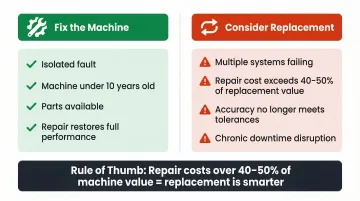
Every repair decision should weigh the cost of the fix against the machine's remaining productive life, the risk of recurring failure, and the impact on shop throughput.
Fix the machine when:
- The fault is isolated to a single, known component (belt, bearing, sensor)
- The machine is relatively young (under 10 years)
- Replacement parts are readily available and affordable
- The repair restores full performance within a reasonable timeframe
Consider replacement when:
- Multiple systems are failing simultaneously or repeatedly
- Repair costs exceed 40-50% of machine replacement value
- The machine no longer meets accuracy requirements for your shop tolerances
- Downtime frequency is causing chronic production disruption
A well-maintained industrial stone fabrication machine has an expected lifespan of 10 to 15 years, with heavy-duty structural frames lasting 15 to 20+. Operating in harsh, wet, and abrasive environments without consistent maintenance can shorten that to 5 years or less.
When replacement is the right call, choose equipment designed for reliability with easily sourced parts. Crown Stone USA builds stone fabrication machinery with parts readily available in the US, with less than 2% of components by value originating from China. That sourcing approach reduces repair lead times and avoids repeating the same maintenance headaches with new equipment.
The Crown Stone USA Bridge Saw Table, for example, went through 10 design iterations and features CNC-machined rolling surfaces, moisture-resistant construction, and straightforward maintenance (grease every 2 months). It's built to stay in service, not to become the next repair project.
Common Mistakes to Avoid When Troubleshooting
These three patterns show up repeatedly across shops of all sizes — and each one turns a manageable repair into a bigger headache:
- Chasing symptoms instead of root causes. Replacing a spindle when the real problem is a failing VFD, or swapping a bit when the workpiece is moving, wastes money and leaves the actual fault in place. Confirm what's actually broken before ordering parts.
- Skipping post-repair validation. Returning a machine to production without testing it under load risks the same failure mid-job — compounding scrap loss and potential damage. Run a test cut on scrap material first.
- Installing off-spec replacement parts. Belts, bearings, or collets that don't match manufacturer specifications can shift tolerances and introduce new failure points. Cross-check part numbers against documentation before installing, especially for spindle bearings and linear guides.
Preventive Maintenance to Minimise CNC Router Downtime
Preventive Maintenance to Minimize CNC Router Downtime
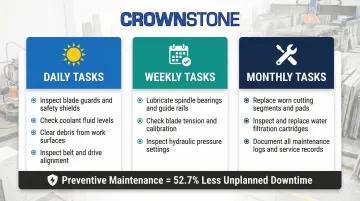
Most CNC router failures are preventable. Regular, scheduled maintenance performed consistently outperforms reactive repair in both cost and machine longevity. Manufacturing facilities that rely on preventive and predictive maintenance experience 52.7% less unplanned downtime and 78.5% fewer defects.
Daily and weekly inspections:
- Wipe down linear rails and check for debris, slurry, or corrosion after each shift
- Check belt tension and coupling tightness weekly
- Inspect collets for wear and clean spindle vents regularly
- Clear stone slurry from the work table and verify coolant flow daily
In stone fabrication environments where silica dust accumulates rapidly, these daily habits prevent 60-70% of common breakdowns. Scheduled lubrication is the next line of defense.
Scheduled lubrication and component replacement:
- Lubricate ball screws, linear guides, bearing cars, and racks monthly using manufacturer-specified lubricants
- Replace collets, bearings, and drive belts at recommended intervals
- Monitor spindle condition—most water-cooled spindles need replacement or rebuilding every 3 to 5 years (5,000 to 10,000 hours)
Operator training and documentation:
- Ensure all operators understand correct feed rates, depth-of-cut settings, and warm-up procedures for your specific materials
- Log maintenance activities and recurring faults to identify patterns before they become failures
- Create checklists for daily, weekly, and monthly maintenance tasks
- Train operators to recognise early warning signs (unusual noise, vibration, temperature changes)
Conclusion
The majority of CNC router problems—poor cut quality, spindle failures, movement errors, and software faults—follow predictable patterns and are fixable when caught early with the right diagnostic approach.
Correct root cause identification is the difference between a lasting repair and a repeat failure. Knowing when to stop repairing and invest in replacement equipment protects long-term shop productivity. Use the 40-50% repair cost threshold as your guide: once a single repair crosses that mark, replacement is the more cost-effective call.
Frequently Asked Questions
How long does a CNC router last?
With proper maintenance, a well-built CNC router can last 10 to 20 years, though stone shop environments accelerate wear significantly compared to light-duty use. Consumable components like water-cooled spindles typically need replacement every 3 to 5 years.
Why is my CNC router not cutting straight?
The most common causes are loose belts or couplings, worn linear guides, stepper motors skipping steps, incorrect toolpath settings, or unsecured workpieces. Check mechanical components first—belt tension, rail lubrication, coupling tightness—then verify software settings like work coordinates and G-code.
What causes a CNC router spindle to overheat?
Spindle overheating typically results from a blocked or failing cooling system, worn bearings increasing friction, operating at excessive RPM for the material, or electrical issues such as VFD misconfiguration. Address cooling first—check water flow, clear blocked cooling passages, and verify pump operation—before investigating electrical causes.
How do I know if my CNC router needs professional repair vs. a DIY fix?
Mechanical issues like belt replacement, lubrication, and limit switch swaps are generally manageable in-house. Electrical faults involving the VFD, control board, or spindle rewinding should involve a qualified technician—and when in doubt, consult the manufacturer's technical support.
How often should I service my CNC router?
In stone shop environments, clean and inspect daily, lubricate weekly, and run a full mechanical check—belt tension, coupling integrity, bearings—monthly. Document everything to track wear patterns and anticipate component replacements before they become failures.
Can dust and slurry from stone cutting damage a CNC router?
Yes. Silica dust and water-based cutting slurry are among the most damaging environmental factors for CNC routers in stone fabrication shops. Hard particulate contamination causes plastic deformation, indentations, and abrasive wear on rolling surfaces, drastically reducing bearing life. Slurry infiltration corrodes electrical connections, clogs spindle cooling vents, and contaminates linear guides. Enclosure management and post-shift cleaning are critical protective habits.