
Introduction
Setting up a bridge saw for the first time is moderately complex—it requires precision, patience, and the right sequence. Unlike plug-and-play equipment, a bridge saw must be physically leveled, squared, calibrated, and validated before it ever touches a slab. Many fabrication shops struggle with setup errors that immediately impact production quality: non-square cuts that fail seam tolerances, premature blade wear from vibration, and costly material waste from dimensional inaccuracy.
Most installations don't require a specialist, but they do demand someone comfortable with precision measuring tools and a disciplined sequence. Skipping or rushing any phase creates compounding problems: vibration damage to spindle bearings, blade chatter that ruins cut faces, and seam gaps exceeding the Natural Stone Institute's 1/16" tolerance standard.
What follows covers every phase: site prep and leveling, blade installation, water system setup, and first-cut validation. Get the setup right once, and the machine will run clean from day one.
TL;DR
- Setting up a bridge saw requires multiple phases: foundation prep → leveling → squaring → blade installation → water setup → calibration → validation
- Foundation must support 6,000–16,535 lbs plus slab weight before installation begins
- Three-phase power and pressurized water supply must be operational before delivery
- Table must be level using a precision machinist's level (not construction-grade), with bridge square to fence before cutting
- Calibration confirmed through dial indicator and test cuts determines whether your saw produces accurate results or wastes material from day one
- First-cut validation is non-negotiable: a properly set-up saw cuts square, runs quietly, and produces clean edges without chatter
Before You Begin: Site Readiness, Foundation, and Prerequisites
Confirm Your Foundation Can Support the Load
Bridge saws are heavy industrial machines. The Park Industries Yukon II weighs 6,000 lbs for the saw unit alone, plus 10,000 lbs for its turntable—a combined 16,000 lbs. The AITAL Orbit A5 5-axis CNC bridge saw weighs 16,535 lbs with a footprint of 19' x 15' x 10'.
Your floor must handle combined machine weight, slab load, and dynamic cutting forces. An inadequate foundation creates vibration problems that calibration alone cannot fix: blade wander, premature wear, and cut quality issues that compound across every job.
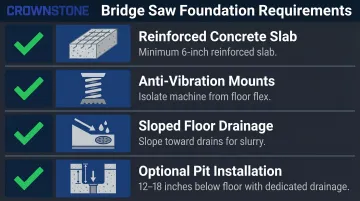
Foundation requirements:
- Minimum 6-inch reinforced concrete slab as the base (verify with structural engineer)
- Anti-vibration mounts between machine base and floor to isolate from floor flex
- Floor sloped toward drains to handle slurry water
- Some manufacturers recommend installing the saw 12-18 inches below surrounding floor level in a shallow pit with dedicated drainage
Verify Electrical and Water Utilities Are Ready
Three-phase electrical supply is universal for commercial bridge saws. Typical requirements include:
- Voltage: 220V, 380V, or 480V depending on your region
- Amperage: Varies by model—Crown Stone USA's Avalanche Pro requires 60 amps (three-phase option) or 100 amps (single-phase option)
- Maximum installed power: Up to 22 kW on mid-range 5-axis models
Verify voltage and phase availability with your electrician before purchasing. The electrical supply must be tested and functional before delivery day.
Water supply serves three critical functions: cooling the blade, lubricating the cut, and flushing stone chips from the cutting zone. Bridge saws consume 5-8 GPM during cutting, with harder materials like quartzite demanding 7-9 GPM.
| Material | Water Flow Rate | Notes |
|---|---|---|
| Marble/Limestone | 4-6 GPM | Moderate flow |
| Granite | 6-8 GPM | Aggressive flow |
| Quartzite/Porcelain | 7-9 GPM | Maximum flow required |
Those flow rates aren't arbitrary. OSHA's silica standard (50 µg/m³ permissible exposure limit, 8-hour TWA) requires continuous water delivery at the tool-material interface — water must flood the cutting kerf, not just splash the blade face.
Running low flow causes blade overheating, segment glazing that cuts speed by 50%, and silica dust levels that create real liability.
Contact Your Manufacturer Before Delivery
Before delivery day, contact your supplier with any questions about site requirements specific to your model. Crown Stone USA provides downloadable spec sheets and direct technical support at 727-239-9875 — confirm foundation specs, electrical requirements, and water system details before the machine shows up.
Setup and Leveling Your Bridge Saw
Leveling is the reference plane for everything that follows. A table that isn't level means slabs won't sit flat, creating variable cutting depths, blade binding risk, and inaccurate cuts that cannot be fixed at calibration.
Leveling the Table
Use a precision machinist's level — not a construction bubble level. Construction levels resolve only to 1-2 mm/m, while machinist levels offer 0.0005" sensitivity per 10 inches, roughly 10-50x finer resolution.
Leveling procedure:
- Place the machinist's level across the table in at least five positions:
- Front-to-back on the left side
- Front-to-back on the right side
- Side-to-side at the center
- Side-to-side at both ends
- Adjust leveling feet iteratively until all readings fall within the manufacturer's stated tolerance (typically ±0.5mm over the full table span)
- Tighten all anchor bolts to secure the machine
- Re-check all five positions after tightening—tightening can shift the machine slightly and throw off earlier readings
The Natural Stone Institute's dimensional tolerance for finished countertop length and width is +/-1/16" (1.5 mm). Over a 10-foot slab, even a small angular error in the table plane produces thickness variation that exceeds this tolerance — creating visible defects at seams.
Squaring the Bridge to the Table
After the table is level, verify the bridge travel direction is perfectly perpendicular to the fence (the crosscut reference).
Squaring procedure:
- Mount a dial indicator (0.001" resolution minimum) on the cutting head
- Run the bridge across its full travel while reading the indicator against the fence
- Confirm the reading does not vary—any drift indicates the rails or table are not square
- Adjust rails or table position if drift is detected
- Re-run the test until drift is eliminated
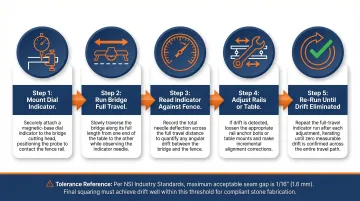
Even 1mm of non-squareness over 1 meter of bridge travel produces visibly mismatched seams when two cut pieces are joined. The NSI standard for acceptable seam width is 1/16" (1.5mm) with a tolerance of +/-1/64" (0.4mm) — bridge squareness errors directly cause seam failures that cost material and credibility.
Calibrating Your Bridge Saw for Accurate Cuts
Calibration verifies and adjusts the machine's measuring systems—fence position, cutting head alignment, depth stop, and miter angle—so that programmed or measured dimensions translate into accurate, repeatable results in the stone.
Setting the Fence and Measuring System
Verify the fence is parallel to bridge travel (X-axis):
- Use a dial indicator to check fence parallelism across its full length
- Adjust the fence if drift is detected
- Confirm the indicator reading remains constant across the fence span
Fence errors produce non-parallel edges that open gaps at seams.
Calibrate the measuring tape or digital readout (DRO):
- Zero the system at the blade kerf
- Make a test cut and measure the actual result with a caliper
- Adjust offset in the control system if there is a discrepancy
- Repeat until measured and programmed dimensions match
DRO systems for machine tools offer 0.005mm (0.0002") resolution—fine enough to maintain the NSI's +/-1/16" tolerance for countertop dimensions.
With the lateral fence and DRO dialed in, shift focus to the vertical dimension and angular positions that govern depth cuts and miter joints.
Setting Depth and Miter Angle
Depth stop verification:
- Lower the blade to the programmed depth
- Use a depth gauge or feeler gauge to confirm the blade's lowest point matches the intended cut depth
- Adjust the depth stop if there is a discrepancy
Depth accuracy is critical for partial-depth cuts and multi-pass passes.
Miter angle verification:
- Use a precision square or protractor gauge against the blade face
- Verify the 90° (vertical) cutting position is accurate
- Verify the 45° miter position is accurate
- Adjust mechanical stops if your machine includes them
Confirm both positions are accurate before first production cuts—miter angle error directly affects mitered edge joints on countertops. Crown Stone USA's bridge saws use air-cylinder powered indexing to lock into 90° and 45° positions, which simplifies this step, but physical verification with a gauge is still good practice on any machine.
Blade Installation, Water System Setup, and First-Cut Validation
Blade Installation
Correct blade installation is critical. A warped or incorrectly mounted blade immediately causes chipping and vibration that is misdiagnosed as a calibration problem.
Installation procedure:
- Confirm blade specifications match machine specs:
- Blade diameter
- Arbor bore diameter (must match shaft diameter exactly)
- Rotation direction (arrow stamped on blade)
- Clean mounting surfaces: Remove debris from arbor and flanges
- Mount blade using correct flanges:
- Flanges must be clean, flat, and identical in diameter
- If one flange is replaced, replace both together
- Tighten arbor nut to spec: Follow manufacturer's torque specification—overtightening can deform the blade core, undertightening risks blade ejection
- Check for runout: Spin the blade by hand before powering on—verify it runs true with no wobble

Blades must be tightened in a star pattern to manufacturer torque specs. Improperly seated blades create dangerous vibration at high RPM.
Water System Setup
Once the blade is seated, water setup is the next step before any power-on. Get this wrong and you'll damage the blade before the first real cut.
- Position nozzles correctly: Water must flood the cutting interface (the kerf)—not just splash the blade face. Direct pressurized flow to the exact point where the blade enters the stone.
- Match flow rate to material:
- Marble/limestone: 4–6 GPM
- Granite: 6–8 GPM
- Quartzite/porcelain: 7–9 GPM
- Run the water system before powering the blade: Confirm flow is consistent and unobstructed. Check for clogged nozzles from slurry buildup.
Inadequate water flow causes blade overheating, segment glazing, and silica dust exposure—problems that compound fast. Even a brief dry-cut can destroy diamond segments and shorten blade life significantly.
Crown Stone USA's Avalanche Pro includes an automatic water valve that activates during cutting, removing one common point of operator error. The company's water recycling systems handle 40 GPM (small version) or 70 GPM (large version), using flocculant-based settling to keep delivered water clean.
First-Cut Validation
Make a test cut in a scrap piece of the intended material, then measure the result.
Validation checklist:
- Squareness: Use a reliable square to confirm the cut edge is 90° to the slab face
- Dimension: Measure the cut dimension and compare to the programmed value—should match within tolerance
- Cut face quality: Inspect for chipping, saw marks, or blade wander—a correctly set-up machine produces a clean, square, dimensionally accurate cut
Indicators of setup problems:
| Problem | Likely Cause | Section to Revisit |
|---|---|---|
| Dimensional error | Calibration or fence issue | Fence parallelism, DRO zero |
| Non-square edge | Bridge squareness or table level issue | Bridge squaring, table leveling |
| Excessive chipping | Blade speed, feed rate, or water flow | Water system setup |
| Saw marks or wavy cut face | Blade vibration, inadequate water, or loose arbor | Blade installation, water flow |
Catching these at validation prevents them from running through a full day of production.
Blade Break-In Protocol
Most first-time buyers skip this step. Only 45% of shops always break in new blades, while 8% never do—directly contributing to premature blade failure.
Break-in procedure:
- Run the first 10-15 cuts at moderately reduced feed rate (50% reduction for easy-to-cut materials, 75% reduction for hard materials)
- Use standard material like granite for break-in
- Purpose: Wearing off the sharp pointed edge of new blade teeth to form a small rounded tip that withstands cutting pressures without fracturing
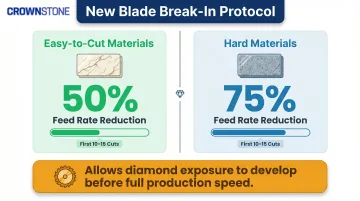
Starting at full aggressive feed rate on a brand-new blade before the diamonds are properly exposed can load the segments and reduce cutting efficiency for the blade's entire lifespan.
Common Bridge Saw Setup Problems and Fixes
First-time setup issues almost always trace back to foundation/leveling errors, calibration shortcuts, or measurement zeroing errors. Diagnose the cause before adjusting anything — it saves you hours of backtracking.
Non-Square or Wavy Cuts After Setup
Cut edges that aren't square to the slab face — or a cut line that curves across the length of a slab — usually mean the bridge isn't perpendicular to the fence, or the table isn't level. Either condition causes the slab to sit at an angle to the cutting plane.
To fix it:
- Re-run the bridge squaring check with a dial indicator
- Re-check table level at all five positions
- Confirm both are within tolerance before running any production cuts
Blade Chatter or Vibration During Cutting
Audible chattering, visible blade vibration, or rough/chipped cut faces point to a mounting problem or a foundation issue. Loose flanges, incorrect torque, or debris on the arbor surface are the most common culprits — but a poor foundation can transmit vibration into the machine even when mounting is correct.
To fix it:
- Power down and remove the blade
- Inspect flanges, torque, and arbor surfaces for debris
- Reinstall and re-torque to spec; if vibration persists on a concrete slab with no obvious mounting faults, add anti-vibration pads under the machine feet
Dimensional Inaccuracy (Cut Doesn't Match Programmed Size)
If cut pieces consistently come out at a different dimension than programmed, the fence measuring system or DRO was almost certainly not zeroed at the blade kerf — or kerf width wasn't factored into the offset setting.
To fix it:
- Re-zero the measuring system at the blade kerf face
- Run a test cut and measure the result with a caliper
- Adjust the offset in the control system until measured and programmed dimensions match
Most setup problems have a clear cause once you know where to look. If an issue persists after working through these checks, consult your machine's documentation or contact the manufacturer before running production material.
Pro Tips for First-Time Bridge Saw Buyers
Document your setup: Photograph or record all leveling readings, squareness checks, and calibration settings during initial setup. This creates a reference baseline—if the machine drifts over time (which happens from normal vibration and use), you'll know the correct values when re-calibrating.
Establish a break-in protocol: Run the first 10-15 cuts at reduced feed rate on granite to allow the blade's diamond exposure profile to develop properly. This simple step prevents segment glazing that reduces blade life by up to 70%.
Buy from people who've actually run a bridge saw: Equipment designed by working fabricators tends to have intuitive controls and logical adjustment points. Crown Stone USA's Avalanche Pro and Bridge Saw Table were both developed by people who cut, lifted, and installed stone — the table alone went through 10 design iterations before it shipped.
Key features that reflect that experience:
- Avalanche Pro: Kinco HMI touchscreen with color-coded buttons, labeled axis controls, and prominent emergency stop
- Bridge Saw Table: straightforward leveling system, air-cylinder powered indexer with labeled controls, and CNC-machined rolling surfaces that resist moisture trapping
When in doubt, call your manufacturer: A machine is only as useful as the support behind it. Crown Stone USA's technical support team at 727-239-9875 can walk you through setup questions for your specific machine — no runaround, just direct answers.
Conclusion
Setup and calibration determine everything that follows. Done right, your bridge saw becomes a reliable production asset from day one. Done poorly, even a well-specified machine will produce inconsistent cuts, waste material, and generate repair bills that dwarf the time you saved by rushing.
Invest the time in each phase before cutting a single production piece. A disciplined first-day setup pays back immediately and compounds over the machine's lifespan:
- Material yield — accurate cuts mean fewer ruined slabs
- Cut quality — proper calibration eliminates rework from the start
- Machine longevity — correct alignment reduces wear on blades and components
- Avoided repair costs — professional service calls run hundreds to thousands of dollars
The hours you spend leveling, squaring, and validating on day one are the lowest-cost investment you'll make in this machine.
Frequently Asked Questions
What is a bridge saw?
A bridge saw is a gantry machine tool with a bridge that moves on rails, carrying a tilting cutting head that travels across stone slabs. It's the primary tool for making precise straight and miter cuts in granite, marble, and quartz.
Does a table saw need to be level?
Yes—for a bridge saw specifically, this is non-negotiable. An unlevel table means the slab doesn't sit flat against the cutting plane, causing variable cut depth, blade binding, and inaccurate cuts that compound through production.
How long does it take to set up a new bridge saw?
A thorough first-time setup typically takes a full day. That includes leveling, squaring, blade installation, water system setup, calibration, and first-cut validation. Rushing to begin production sooner leads to costly errors and rework.
What type of foundation does a bridge saw require?
Most manufacturers require a minimum 6-inch reinforced concrete floor slab, with anti-vibration mounts between the machine base and the floor. An inadequate foundation transmits vibration into the cutting head, causing blade wander and premature wear that cannot be corrected through calibration.
How do I know if my bridge saw is calibrated correctly?
Run a first-cut validation in scrap material. The cut should be square to the slab face, match the programmed dimension within tolerance, and produce a clean face without chipping or saw marks. If it doesn't, go back to squaring and level checks before adjusting the blade.
What blade should I install first on a new bridge saw?
Install a blade that matches your primary material — for example, a segmented diamond blade for granite — and confirm it matches the machine's arbor bore and maximum diameter spec. For break-in, run the first cuts at a reduced feed rate to allow diamond exposure to develop before moving to full production speed.